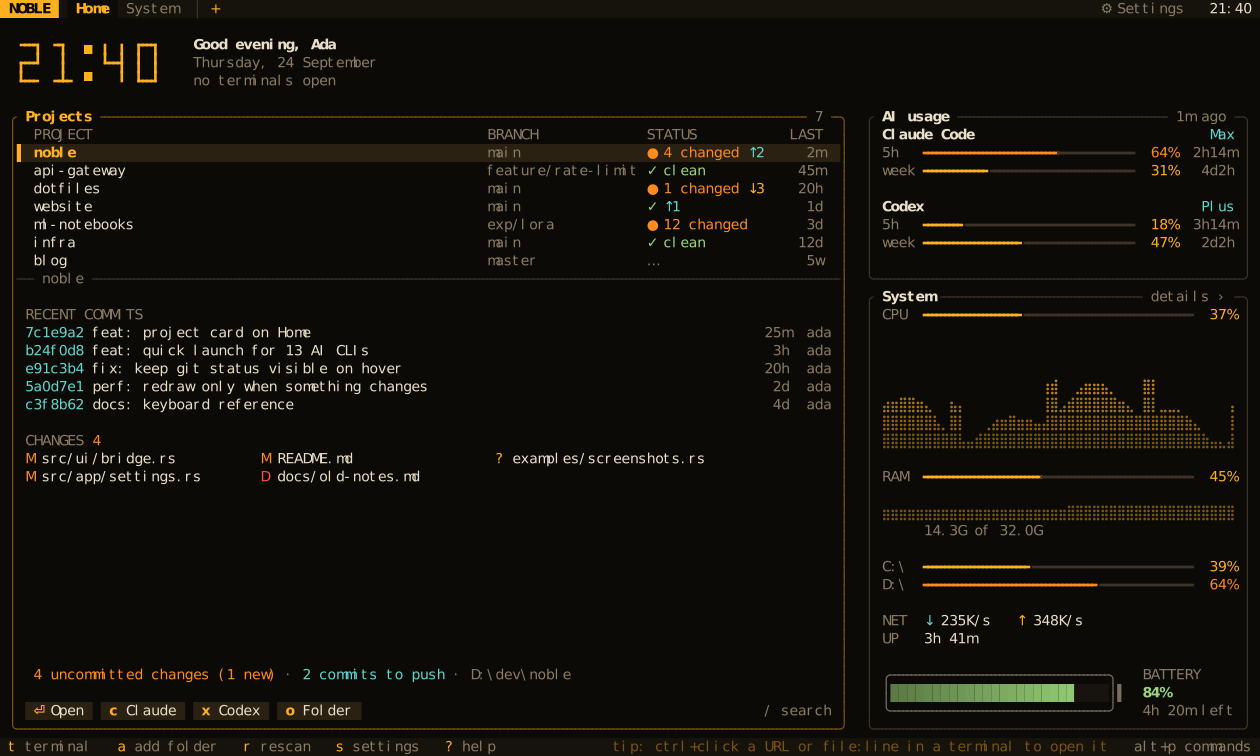
Real shells, every git project, live system sensors and the quota left on your AI coding plans, on one screen. Start Claude Code or Codex in any project with a single key. One 22 MB binary for Windows and Linux.
From “which folder was it?” to an agent at work, in three keys.
No cd-ing through directories, no hunting for the right window. NOBLE opens on your projects, and the rest follows from there.
↑↓
Pick a project
NOBLE finds your git repositories on its own: branch, changes and commits to push or pull at a glance.
api-gateway noble main●3↑1dotfiles landing-site
⏎
Open its shell
A real shell opens right in that folder, in a tab you can split, zoom and search.
~/dev/nobleonmain ❯ cargo test test result: ok.146 passed ❯
corx
Hand it to an agent
Claude Code, Codex or any other AI CLI starts in the project. Its remaining quota stays in view.
✻ Claude Code · ~/dev/noble > add a scrollback search ● working· 5h quota42%
Features
Everything a coding session needs. Nothing it doesn’t.
NOBLE stays deliberately simple: a few screens, each doing one job well, and every one of them clickable.
❯_
Real terminals
ConPTY on Windows, a PTY on Linux. Tabs, splits, zoom, drag to resize, scrollback search, ctrl+click on URLs and file:line paths. vim, htop and Claude Code run full-screen with mouse support.
1 noble2 api ◆3 claude+
~/dev/noble❯ git status On branch main modified: src/app/search.rs ❯
Branch, changes, ahead and behind. The status refreshes the moment a command finishes.
noblemain●3 ↑1
api-gatewayfeat/auth↓2
dotfilesmain✓
▁▃▅
System monitor
CPU history, per-core load, memory, network, disks, battery and a sortable process table.
CPU17% · 16 cores · 4.2 GHz
⌖
Mouse first, keyboard too
Every button, tab, row and chip is clickable, with menus on right-click. A tmux-style prefix and alt+p cover the keyboard.
Open terminal
Start Claude c
Open folder o
Pin to top
⟲
Sessions and workspaces
Tabs, splits and each shell’s folder come back on the next launch. Save named workspaces and reopen them from the palette.
◢ client-work4 tabs
◢ noble-release2 tabs · 3 panes
◐
20 themes, live config
Terminal panes follow the theme, a built-in scheme or, on Windows, your Windows Terminal scheme. config.toml reloads live and a bad value never crashes the app. Click a swatch:
◆
Never miss a finished job
A background tab lights up when a long command finishes, the bell rings, an app sends a notification or Claude asks for permission.
1 editor2 build ✓ 3m 12s3 claude ◆4 logs
AI quota and sessions
Know how much Claude is left before the big refactor.
NOBLE reads the logins your AI CLIs already keep and shows the 5-hour and weekly limits of six providers right on Home. When your pace would fill the window before it resets, it tells you.
Claude Code max64% · resets in 1h 12m
Claude Code week38% · resets in 4d 6h
Codex plus21% · resets in 3h 40m
OpenCode Go month87% · resets in 9d 2h
▲ 5h full in ~48m at this pace NOBLE notices before you hit the wall, and warns once when a window reaches 90%.
Claude CodeCodexAntigravityOpenCode GoKilo CodeCommand Code
Which Claude is waiting for you?
With the optional hooks on, Home lists every Claude Code session and what it is doing.
◆ api-gatewayneeds you
● nobleworking
○ landing-siteyour turn
Tokens go only to their own provider. They are never displayed or logged.
NOBLE never refreshes a token, so it can’t race the CLI’s own rotation.
Quotas are fetched only while Home is open. In a terminal, NOBLE makes no network calls.
Screens
Not mockups. Frames drawn by NOBLE itself.
Every image here is rendered by NOBLE’s own drawing code from a demo session, in whichever theme you have picked on this page.
noble
Projects, recent commits, AI quota and system sensors on one screen.
Themes
Twenty themes. Try them on this page.
Pick one and the whole site switches to it, screenshots included. Or press alt+t and flip through them as fast as you like.
Performance
Light enough to leave open all day.
There is no fixed frame rate. NOBLE redraws only when something visible changes, and background work follows what is on screen. Your battery will not notice.
Measured, not promised
CPU is a share of one core, measured with NOBLE’s own idle benchmark in its end-to-end test suite.
idle terminal tab
0.05%
Home screen
0.4%
memory
22 MB
heavy output
≤60 fps
Work only when it matters
sensorsevery second on System and Home (2 s on battery), every 5 s elsewhere
git statuswhen a command finishes, when Home opens or when a repository changes
AI quotaonly while Home is open
on batterythe Home clock drops its seconds and the blinking colon
updatesone check a day, off with a single setting
Cross-platform
Windows and Linux, equal citizens.
Not a Linux tool with a Windows port, or the other way around. CI runs the whole test suite, real terminals and end-to-end tests included, on both.
Windows
ConPTY terminals with PowerShell, cmd and Git Bash
Your prompt keeps working, oh-my-posh included
Terminal colors read from your Windows Terminal schemes
AltGr symbols on Turkish, German, Polish… layouts just type
Linux
Static x86_64 and ARM64 binaries that run on any distribution
bash, zsh and fish load your own rc files; Starship and oh-my-zsh keep working
Clipboard on X11 and Wayland, OSC 52 over SSH
No desktop? Links are copied and files open in your $EDITOR
Install
Up and running in a minute.
Any truecolor terminal with a regular monospace font works. No Nerd Font, no config file to write first.
Prefer a prebuilt binary? See the install guide for Windows and Linux.
⏎ open a terminal in the selected project
cx start Claude or Codex right there
alt+p command palette: everything is in there
? every shortcut; ctrl+click opens links
The four keys worth knowing, exactly as NOBLE’s welcome card shows them on the first launch.
Your next session deserves a cockpit.
Free, open source and one command away. Try it for a day; the keys come naturally by lunch.